
SimplyWise Cost Estimator
SimplyWiseBusiness
4.81.56K Reviews
- Version
- 0.20.0
- Installs
- 500.00K
- Age Rating
- Everyone
Screenshots



Our Review of SimplyWise Cost Estimator
 Analysis by Appyee
I like the idea behind SimplyWise Cost Estimator: give a home project enough structure to make spending decisions before the work begins, without turning budgeting into a second job. That is a useful promise for anyone trying to plan a repair or renovation, but it is also one I’d approach with a little caution. An estimate is a starting point, not a contractor’s quote, and the app is most valuable when I use it to organize assumptions rather than treat its total as a guarantee.
As a business app from SimplyWise, it sits between a blank spreadsheet and the more involved tools used by construction professionals. I can see the appeal for homeowners who want a quick view of materials and repair costs, especially when a project is still at the “Should I do this now?” stage. The free download makes it easy to try, while in-app purchases range from $4.99 to $119.99 per item, so I’d check what is included before committing to anything beyond basic use.
Where an early estimate can help
The strongest case for this kind of tool is not that it can predict every final bill; it is that it can help me ask better questions. A repair estimate gives a homeowner a rough framework for comparing priorities, deciding what can wait, and spotting a cost category that has been overlooked. SimplyWise Cost Estimator is aimed at that practical early planning rather than replacing a professional assessment.
For example, if a damaged section of a room needs attention, I would separate the work into the obvious repair and the supporting materials or tasks around it. That makes it easier to see whether the project is small enough to handle soon or whether it deserves a proper quote and a more careful budget. It also gives me something more useful than a vague figure to discuss with a contractor.
The app’s focus on construction estimates and material calculations gives it a narrower purpose than a general household budget app. That focus is welcome: project spending is easier to reason about when it is kept separate from groceries, bills, and regular savings. I would still keep a record of any final quote and receipts outside the estimate until I know the app’s workflow suits how I manage a project.
Getting Started with SimplyWise Cost Estimator
First things first, downloading and setting up the app was a breeze. Available on both Android and iOS, it took just a few taps, and I was good to go. The interface is refreshingly simple; it’s not cluttered like some other apps. You’re greeted with a clean dashboard that immediately makes you feel like you’ve got everything under control.
Setting up your first project is intuitive. The app guides you through a step-by-step process to input all necessary details. Whether it’s a kitchen remodel or a landscaping project, SimplyWise Cost Estimator allows you to customize categories to fit your needs.
Features That Make Life Easier
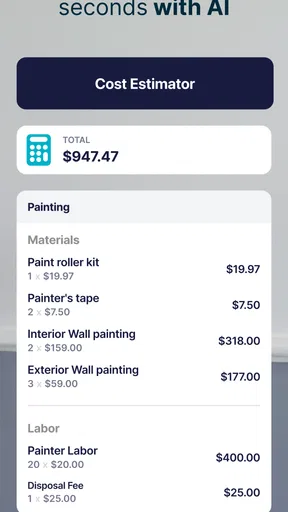
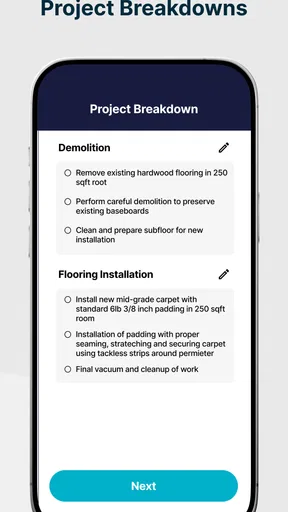
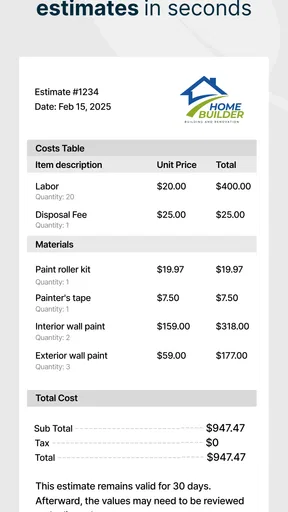
The app shines with its detailed cost breakdown feature. You can break down projects into smaller tasks and assign costs to each. This granularity helps in identifying where most of your money is going. It’s like having a magnifying glass on your budget.
Another cool feature is the comparison tool. It allows you to compare estimated costs with actual expenses. This feature is super handy for keeping your spending in check and making adjustments as needed. I found myself using this a lot to ensure I wasn’t overspending.
One of the standout features is the ability to collaborate. You can share your project details with others, making it a great tool for team projects. This means everyone is on the same page, and there are no surprises when it comes to budget allocations.
Making the numbers more useful
My best tip is to make the first estimate deliberately provisional. Before entering a total, I’d list the work in separate chunks—materials, preparation, and the main repair, for instance—then revise each amount as I learn more. That keeps a low early guess from looking falsely precise. If a contractor later gives a quote, I can compare it with the same categories instead of trying to match one broad figure to another.
There is also a useful distinction between an estimate and a spending record. I’d enter planned amounts first, then update actual costs as purchases happen, rather than waiting until the job is finished and trying to reconstruct what went where. That habit makes the comparison feature more informative: a rising total can prompt a decision while there is still time to change the plan.
For shared projects, I would agree with everyone on who is maintaining the figures before inviting others into the process. Collaboration helps only if people are working from the same assumptions. One person might count delivery or disposal as part of a task while another leaves it out. A quick discussion about what each category includes prevents the shared estimate from appearing more complete than it really is.
Real-World Application
Using the app in a real-world scenario was quite enlightening. I was planning a small patio renovation, and having a detailed cost estimator was a game changer. I could easily see where I could cut costs and where it was essential to invest more. This level of visibility is invaluable.
A realistic use for a homeowner is a weekend repair that starts with a visible problem but may grow once the work begins. I’d create an initial estimate before shopping, use it to decide what I can reasonably spend, and then revise the actual amounts as I buy materials. If the price of an essential item changes the plan, I can look at the other task categories and decide what to postpone instead of treating the whole budget as one inflexible number.
That workflow is especially helpful when I’m comparing options, not just totals. A lower-cost approach may mean more do-it-yourself work or a different material choice; a higher estimate might include work I would rather leave to a professional. The app can help me keep those alternatives visible, but the judgement about durability, safety, and workmanship still belongs to me and, where needed, a qualified tradesperson.
The app’s reminders feature also kept me in line. It’s all too easy to forget about upcoming expenses, but SimplyWise Cost Estimator sends timely reminders to keep you on track. No more last-minute scrambles to find funds for forgotten materials.
Who will get the most from it
I’d recommend this to people planning a modest home repair, a room refresh, or a small outdoor project who want a clearer way to organize costs before spending. It may also suit someone coordinating a project with a partner or another participant, since a shared view can reduce confusion about the budget. The app is for everyone by age rating, and its average rating is 4.7 from around 10,000 ratings, with over 100,000 installs. Those figures suggest it has found an audience, though they cannot tell me whether its estimating approach fits a particular job.
It is less suited to a complex build, a safety-critical repair, or any job where the price depends on conditions that are hard to judge without an inspection. In those cases, I’d start with a professional quote and use an app only as a supporting way to organize questions and compare planned spending. A spreadsheet may be better for someone who needs full control over formulas, custom fields, or a detailed record of every transaction; a general budgeting app is a better fit if the main goal is tracking all household finances in one place.
I would also be cautious about relying on an estimate for work involving hidden damage. A surface-level description cannot account for what may be discovered after a wall, floor, or fixture is opened. My practical approach would be to use the app to establish a working plan, then leave room in my own finances for uncertainty rather than spending right up to the estimate.
What to know before relying on it
SimplyWise Cost Estimator is free to download, but optional in-app purchases cost from $4.99 to $119.99 per item. That is a wide range, so I would explore the free experience first and decide whether any paid option solves a real need in my project. I would not pay simply because a project feels important; the value depends on whether the extra purchase helps me make a better decision or manage the work more clearly.
The app was released on September 17, 2024, and its current version is 0.9.1, with a minimum operating-system requirement of 7.1. I’d check compatibility on my device before planning around it. Since it is a business-focused estimator rather than a full construction-management system, I would also keep essential documents, receipts, and signed quotes in a place I can reliably access throughout the job.
One question people naturally have is whether an estimate can be treated as a firm price. I wouldn’t. Costs depend on the scope, local pricing, product choices, and the condition of the property. The sensible use is to prepare a budget and identify what needs checking—not to assume the app’s figure will match a contractor’s final bill.
Another practical question is whether it can replace a spreadsheet or a professional. For a small project, its guided structure and cost breakdown may be more approachable than starting with a blank sheet. For complex work, unusual materials, or a repair with possible structural or safety implications, neither a simple estimate nor a spreadsheet replaces expert advice. I’d use the tool to prepare for that conversation, not to avoid it.
Final Thoughts
All in all, SimplyWise Cost Estimator is a solid tool for anyone looking to keep their projects on budget without the stress. It’s user-friendly, packed with useful features, and genuinely helps in making informed financial decisions. Whether you’re a seasoned project manager or just trying to renovate your bathroom, this app could be a game changer.
If you’ve been on the fence about getting some help with budgeting your projects, give SimplyWise Cost Estimator a whirl. It might just be the budgeting buddy you never knew you needed.
My recommendation is strongest for people who want an accessible first pass at planning materials and repair costs, and who are comfortable reviewing their assumptions as the project develops. Its clear organization, task-level budgeting, spending comparisons, collaboration, and reminders can make a small job feel more manageable. I would skip it as my sole source of pricing for major or uncertain work, and I would compare any paid option with the value I expect to get from it.
The bottom line: I see it as a practical planning companion, not an authority on what a home project will ultimately cost. Use it to break a vague idea into decisions you can examine, keep real quotes and expenses close at hand, and bring in professional judgement when the job calls for it. That is where this app makes the most sense.
Privacy and Permissions
See what permissions an app requests and how it handles your data.
- Calendar
- read calendar events plus confidential information, add or modify calendar events and send email to guests without owners' knowledge
- Contacts
- read your contacts
- Phone
- read phone status and identity
- Photos/Media/Files
- read the contents of your USB storage, modify or delete the contents of your USB storage
- Storage
- read the contents of your USB storage, modify or delete the contents of your USB storage
- Camera
- take pictures and videos
- Microphone
- record audio
- Wi-Fi connection information
- view Wi-Fi connections
- Device ID & call information
- read phone status and identity
- Other
- view network connections, change network connectivity, full network access, change your audio settings, run at startup, draw over other apps, control vibration, prevent device from sleeping
Verdict
Strengths of SimplyWise Cost Estimator
- Intuitive interface for quick navigation.
- Accurate cost estimates based on inputs.
- Customizable templates for various projects.
- Syncs easily with cloud storage services.
- Supports multiple currencies for global use.
Limitations of SimplyWise Cost Estimator
- Limited features in the free version.
- Occasional bugs in offline mode.
- No integration with accounting software.
- Lacks advanced analytics tools.
- Customer support response is slow.
Other Releases by SimplyWise
View All
SimplyWise: Receipts, Expenses
Finance4.7
Similar Picks in This Category
View All
LinkedIn: Community & Network
LinkedIn3.8

Zoom Workplace
zoom.com4.1

Microsoft Teams
Microsoft Corporation4.6

Meta Business Suite
Meta Platforms, Inc.4.6

Webex Meetings
Cisco Systems, Inc.4.5

TeamViewer Remote Control
TeamViewer4.4
Frequently Asked Questions
What is SimplyWise Cost Estimator and how does it work?
SimplyWise Cost Estimator is a budgeting app designed to help users estimate and manage their expenses effectively. By inputting your financial data, the app provides a detailed analysis of your spending habits, helping you make informed decisions. It's user-friendly and integrates seamlessly with various banking systems for real-time updates.
Is SimplyWise Cost Estimator free to use, or are there any subscription fees?
SimplyWise Cost Estimator offers a free version with basic features. However, for advanced functionalities like detailed analytics and personalized budgeting advice, a subscription plan is available. The fees are competitive, ensuring users get value for their investment in managing their finances efficiently.
How secure is my financial information with SimplyWise Cost Estimator?
Security is a top priority for SimplyWise Cost Estimator. The app uses advanced encryption protocols to safeguard your financial data. Additionally, it complies with international data protection standards, ensuring that your information remains private and secure at all times.
Can SimplyWise Cost Estimator sync with my bank accounts?
Yes, SimplyWise Cost Estimator is designed to sync seamlessly with most major banks. This feature allows for automatic updates of your financial data, ensuring that you have the most accurate and up-to-date information at your fingertips. This integration helps in creating a more precise budget.
What platforms is SimplyWise Cost Estimator available on, and is it easy to use?
SimplyWise Cost Estimator is available on both Android and iOS platforms, ensuring accessibility for a wide range of users. Its intuitive interface makes it easy to navigate, even for those who are not tech-savvy. The app is designed to provide a smooth user experience, with clear instructions and support.
